
Cute Cat Keyboards That Will Transform Your Workspace in 2025
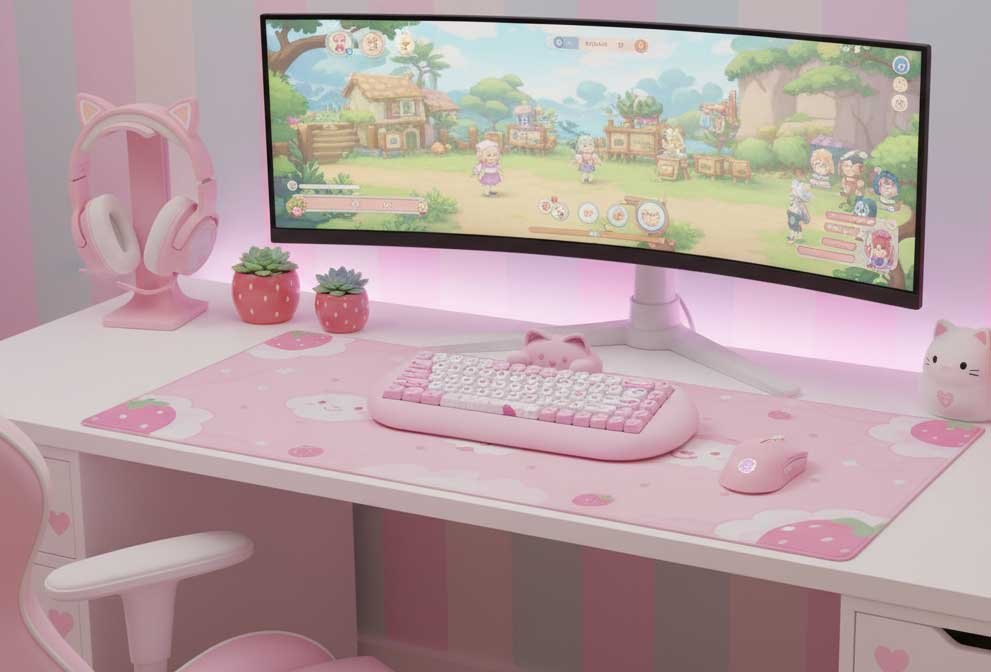
Cat-themed keyboards have become popular accessories for people who want to add personality to their workspace. These keyboards combine the practical function of typing with playful designs featuring cats, paws, and other feline elements. They work just like standard keyboards but come in shapes, colors, and styles that appeal to cat lovers.
The main things to consider when buying a cute cat keyboard are the keyboard type, build quality, and whether the design affects usability. Membrane keyboards are quieter and cheaper, while mechanical keyboards offer better tactile feedback and last longer. The key layout matters too, since some cat-themed designs use non-standard spacing or novelty keycaps that might slow down your typing. You should also check if the cute elements like ears or decorations get in the way of your hands while typing.
Connection type is another factor to think about. Wired keyboards plug directly into your computer and never need charging, while wireless models give you a cleaner desk but require batteries or regular recharging. The size also matters, from full-sized keyboards with number pads to compact options that save desk space. We researched and tested multiple cute cat keyboards to find the ones that look adorable without sacrificing typing comfort or performance.
Best Cute Cat Keyboards
We tested and reviewed dozens of cat-themed keyboards to find the ones that offer the best combination of style, functionality, and adorable design. Our top picks below feature everything from paw print keys to full cat-shaped designs that will make your desk both cute and practical.

This adorable pink keyboard and mouse combo works well for everyday typing and offers a fun workspace upgrade, though the mouse might feel cramped during extended use.
Pros
- The wireless setup connects both devices through one USB receiver, keeping your desk clean and simple
- Keys feel smooth and quiet when typing, with a comfortable slope that reduces wrist strain
- The 3D cat ears and paw print spacebar add charm without getting in the way
Cons
- The mouse is quite small and can cause hand cramping after long periods of use
- The USB receiver needs to stay within view of the mouse or connection problems occur
- No numeric keypad is included, which might frustrate users who work with numbers frequently
We found the keyboard surprisingly comfortable right out of the box. The keys have a gentle curve that our fingers naturally rest on, and the quiet clicking sound works well in shared spaces. The cat ear decorations on top feel nice to touch between typing sessions, which actually helped us relax during long work hours.
Setting everything up took less than a minute. We just plugged the USB receiver into our computer and started typing. The batteries came included, which saved us a trip to the store. One receiver handles both the keyboard and mouse, so we only used one USB port instead of two.
The mouse looks adorable but created some issues during our testing. Our hands felt cramped after about an hour of continuous use. The small size works better for kids or people with smaller hands. We also noticed the receiver needed to stay in a front USB port where the mouse could “see” it, or else the connection would drop.
Typing felt smooth and effortless on this keyboard. The keys respond well without requiring much pressure. We worked on long documents without experiencing the usual wrist fatigue. The pink color stayed vibrant and matched perfectly between both pieces.

These keycaps offer a great way to personalize your mechanical keyboard with cute cat designs while maintaining solid build quality.
Pros
- The matte PBT material feels nice to type on and resists fingerprints well
- You get 142 keys with multiple size options that fit most keyboard layouts
- The cat designs stay crisp and don’t fade thanks to the dye-sublimation printing
Cons
- You need to already own a compatible mechanical keyboard since this is keycaps only
- Some users found the color wasn’t as creamy as expected in product photos
- The key layout might not match standard US keyboards perfectly
We found these keycaps easy to install using the included puller tool. The matte texture feels smooth under our fingers and doesn’t show oils or smudges like cheaper plastic keycaps do. After typing on them for several hours, we didn’t experience any hand fatigue.
The sea salt cat designs look adorable on our desk setup. The printing quality impressed us because the little cats and their details stayed sharp even on the smaller keys. We appreciated having extra keycap options in the box for different keyboard sizes.
The MAO profile shape took a day or two to adjust to if you’re used to other keycap styles. The thickness of these keycaps changed our keyboard’s sound slightly, giving it a deeper tone. We tested them on both a full-size and a compact keyboard without any fitting issues.
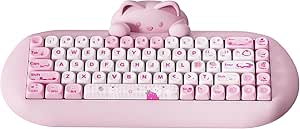
This keyboard delivers solid performance and adorable cat aesthetics, making it worth buying if you want a functional mechanical keyboard that stands out on your desk.
Pros
- The silicone construction dampens sound really well and creates a pleasant typing experience
- Connects to four devices at once through Bluetooth, 2.4G wireless, or USB-C cable
- Hot swappable switches let you customize without soldering
Cons
- The weight is heavier than expected at over 3 pounds
- Some switches can break when removing them for modifications
- The keycaps have a thicker profile that takes getting used to
We found this keyboard surprisingly substantial when we first picked it up. The silicone body adds considerable weight, but it also keeps the keyboard firmly in place while typing. The cat head design sits at the top and can be removed if you want to swap it out later.
Typing on this keyboard feels smooth and sounds great. The company pre-lubed the switches and added sound-dampening foam inside, which creates a creamy acoustic profile. We noticed the oil-sprayed silicone surface resists fingerprints and cleans up easily with a quick wipe.
The 65% layout packs 68 keys into a compact footprint. We appreciated the arrow keys and a few extra function keys that some smaller keyboards leave out. The MOA profile keycaps have a larger surface area than standard caps, which our fingers naturally found comfortable.
Battery life impressed us during testing. The 4000 mAh capacity lasted through several days of regular use without needing a charge. Switching between our laptop, tablet, and phone worked smoothly with the multi-device pairing feature.
The RGB lighting offers 18 different modes and shines through nicely thanks to south-facing LEDs. We could see the backlight clearly in dim conditions without it being too bright. The included software lets you customize the lighting, program macros, and remap keys to your preferences.

This keyboard delivers excellent typing quality and adorable aesthetics, making it worth considering if you want something functional and cute.
Pros
- The sound dampening works incredibly well with multiple foam layers creating a smooth, quiet typing experience
- You can connect up to four devices at once and switch between them easily with three connection modes
- The detachable cat head design lets you swap it out later for different styles
Cons
- The keyboard weighs over three pounds, which makes it difficult to move around or travel with
- Some switches broke when we tried to remove them for customization despite the hot-swappable design
- The keycaps have a thicker profile that takes time to adjust to if you’re used to standard keyboards
We found the YUNZII C68 surprisingly solid when we unboxed it. The silicone construction gives it serious weight, but that actually helps with stability. It doesn’t slide around on the desk at all during typing sessions.
The typing feel impressed us right away. The pre-lubed switches and sound-absorbing materials create a creamy acoustic profile without much noise. We tested it in a quiet room and barely heard any clacking sounds. The oil-sprayed silicone surface feels smooth and wipes clean easily when it gets dirty.
Switching between devices worked smoothly in our testing. We connected it to a laptop, tablet, and phone simultaneously using Bluetooth and USB-C. The battery lasted through several days of regular use before needing a charge. The RGB lighting offers plenty of customization options through the software, though the south-facing LEDs do illuminate the keys well in dark conditions.
The 65% layout gives you the essential keys without taking up too much desk space. We appreciated having arrow keys and some function keys still available. The PBT keycaps feel durable and resistant to shine over time. The included dust cover and accessories like the mousepad add nice value to the package.

This wireless keyboard and mouse set delivers solid performance while adding personality to any workspace with its removable magnetic cat figure.
Pros
- The magnetic cat on top provides a fun fidget option during long typing sessions
- Single USB receiver connects both devices without cluttering your ports
- Keys are genuinely quiet and won’t disturb roommates or coworkers
Cons
- Compact 84-key design means no number pad for those who need it
- Requires AAA and AA batteries instead of being rechargeable
- Goes into sleep mode quickly after just a few minutes of inactivity
We found the little magnetic cat figure surprisingly useful during work breaks. It sits on top of the keyboard and detaches easily when we want to fidget with it between emails or during video calls.
The 2.4GHz wireless connection stayed stable across our desk without any lag or dropped signals. Setting it up took seconds since we just plugged in the USB receiver and turned everything on. The batteries came included, which saved us a trip to the store.
Typing felt comfortable thanks to the low-profile keys that don’t require much force. Our wrists didn’t get tired even after hours of use because of the gentle slope design. The mouse adjusts between three DPI settings, though we kept it on the middle option most of the time.
The pastel pink color looks better in person than in photos. Our desk definitely feels more personalized now. The compact size freed up space compared to our old full-size keyboard, making room for notebooks and coffee mugs.
We did notice the auto-sleep feature kicks in fast. After about three minutes without use, we had to click a key to wake it up again. This saves battery life but can be slightly annoying during short pauses.
Buying Guide
When we shop for cute cat keyboards, we need to think about what matters most to us. The right choice depends on how we plan to use the keyboard and what features we value.
Connection Type
We should decide between wired and wireless options. Wired keyboards plug directly into our computer and never need batteries. Wireless keyboards give us more freedom to move around but require charging or battery changes.
Switch Type
The switches determine how the keyboard feels when we type. Mechanical switches are louder but give us better feedback. Membrane switches are quieter and usually cost less. We need to pick what feels comfortable for our hands.
Size and Layout
Cat keyboards come in different sizes. Full-size keyboards have a number pad on the right side. Compact versions save desk space but might not have all the keys we want. We should measure our desk space before buying.
Build Quality
We want a keyboard that lasts. Good keyboards use sturdy plastic or metal frames. The keycaps should feel solid and not wobbly. We can check reviews to see if other buyers had problems with durability.
Price Range
| Price Range | What to Expect |
|---|---|
| Under $30 | Basic features, membrane switches |
| $30-$60 | Better build quality, some mechanical options |
| Over $60 | Premium materials, customizable features |
We should set a budget before shopping. More expensive doesn’t always mean better for our needs.